Academic structure and timetable
Model your school the way it actually runs, from sessions and terms through classes, sections, subjects, electives, rooms and periods, then build a clash-proof weekly timetable on top of it.
Who uses it: The academic coordinator, the head of section and the school office.
What it handles
Sessions, classes and sections
Set up your academic year, terms, classes and sections once, with one session marked current so every other area knows which year is live.
Subjects and class offerings
Say which subjects each class studies, with default maximum and passing marks that flow straight into exam setup.
Optional and elective subjects
Group optional subjects into templates such as Pre-Medical or Computer Science and enrol a whole section into one in seconds.
- A student can only be enrolled in an optional subject that their class actually offers.
Rooms and bell-schedule periods
Record classrooms and labs, and define the periods of your school day including breaks. New schools start with a standard set you can change.
Teacher and class-teacher assignments
Assign teachers to a section and subject for a session, and appoint one class teacher per section. Those assignments decide what each teacher can do.
Weekly timetable
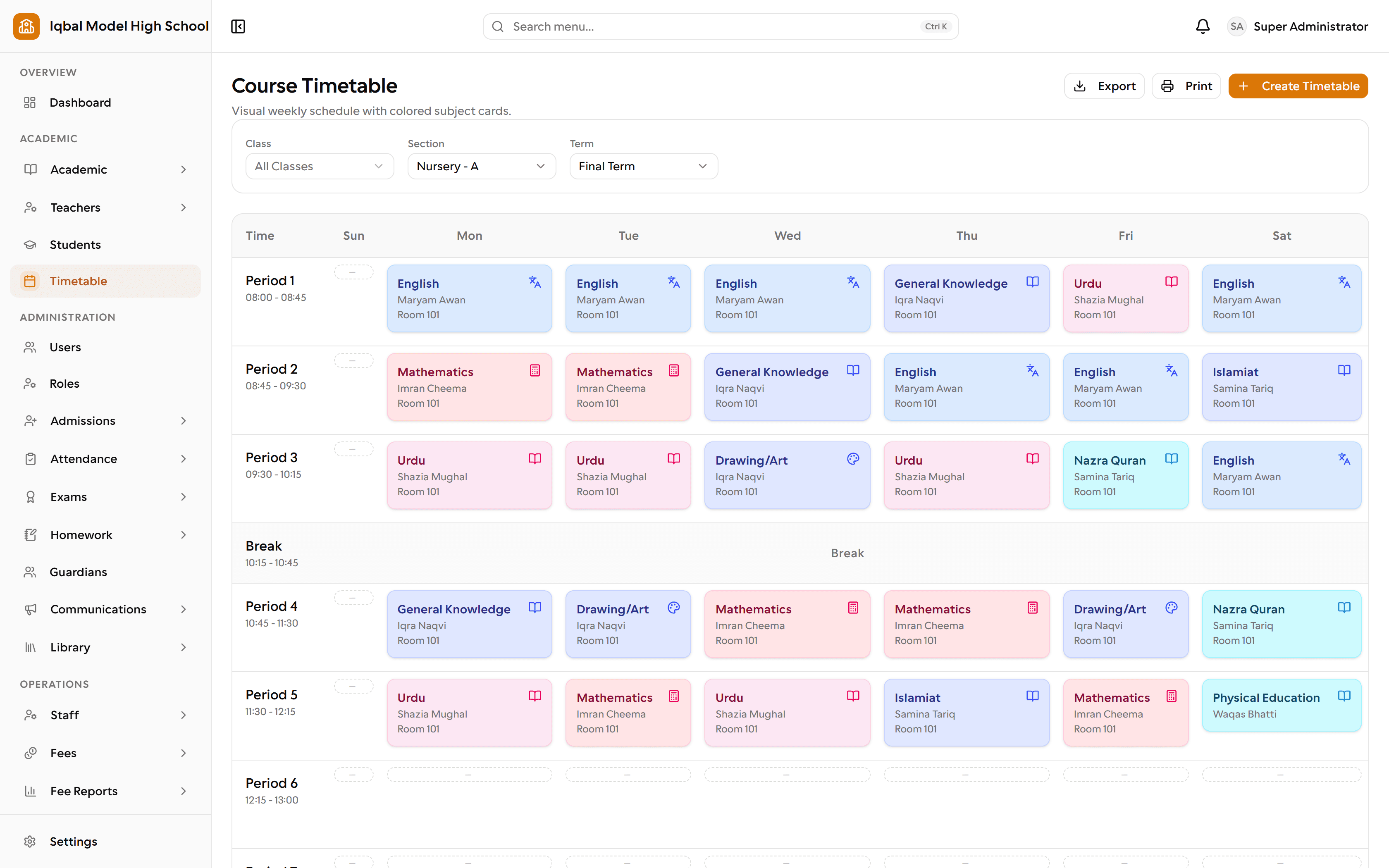
Build the weekly timetable per section on a click-to-fill grid, with colour-coded subjects, and print it on your letterhead.
Timetable clash prevention
The timetable refuses to double-book a section, a teacher or a room, and a conflict report can audit the whole schedule at once.
How the work flows
Set the year
Create the academic session and its terms, and mark one session current. Every other area then knows which year is live.
Build the structure
Classes, sections and subjects, with the campus each section belongs to. The setup wizard offers a starting point for your region so you are not typing from zero.
Say what each class studies
Record the subjects each class offers, with default maximum and passing marks. Those defaults flow straight into exam setup later.
Handle electives
Group optional subjects into templates such as Pre-Medical, then enrol a whole section into one. Only students who actually take an optional subject are examined in it.
Assign teachers
Give each section and subject a teacher for the session, and appoint one class teacher per section. Those assignments decide what a teacher can see and do in their own portal.
Lay out the week
Fill the timetable grid by clicking an empty slot. EDUTIG refuses to double-book a section, a teacher or a room, and a conflict report can audit the whole schedule.
What you need first
- Decide your class and section naming before you start; everything else hangs off it.
- Periods and break times need to exist before a timetable can be built. New schools start with a standard set.
How it behaves
- There is one timetable in force at a time. It is not versioned by term, and substitutions are not tracked.
- Clashes are detected by period, not by overlapping clock times across two differently named periods.
In development for this area
Being built now, not yet available. Each line says what happens today instead.
Substitutions and versioned timetables
One timetable is in force at a time today. Recording a substitution when a teacher is away, and keeping a separate timetable per term, are being built.