Expenses and financial reports
Record what the school spends on numbered vouchers with a proper approval step, then see profit and loss, revenue, expense analysis and cash flow across fees, payroll and expenses.
Who uses it: The accountant, the administrator and the management committee.
What it handles
Expense vouchers
Numbered expense vouchers with line items, an optional supplier and campus, and an approve, pay and reverse workflow. Vouchers are archived, never deleted.
- Requiring approval before an expense can be paid is a setting you control.
Suppliers and purchase orders
A supplier directory shared with your expense records, and purchase orders with line items that top up stock when you mark them received.
Financial reports
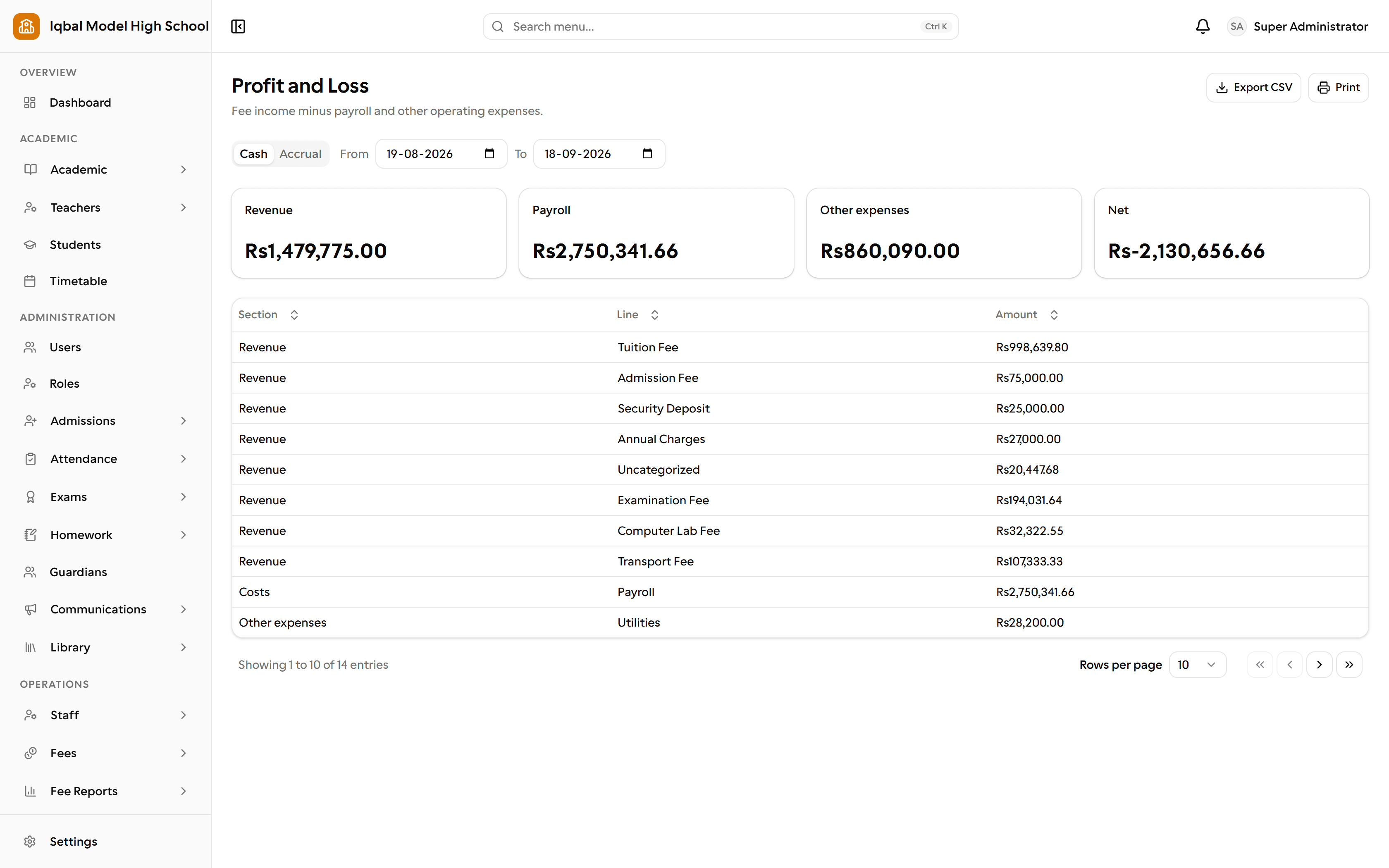
Profit and loss, revenue, expense analysis and cash flow, each switchable between a cash and an accrual view, combining fee collection, payroll and expenses.
- These cover fees, payroll and expenses. EDUTIG is not a double-entry accounting system, so most schools keep their accountant's software for statutory accounts.
Documents that do not change
Receipts, payslips, expense vouchers, report cards and library slips are stored as a snapshot of the moment they were made, so a reprint years later matches the original.
How the work flows
Raise a voucher
A numbered expense voucher with line items, a category, a payee and an optional supplier and campus. Numbering follows your own format.
Approve it
Requiring approval before payment is a setting you control. Once approved, the voucher can be marked paid with a method and a reference.
Correct a mistake safely
A payment is reversed with a reason rather than deleted, and the voucher keeps its history. Vouchers are archived, never removed.
See the picture
Profit and loss, revenue, expense analysis and cash flow, each switchable between a cash and an accrual view, combining fee collection, payroll and other expenses.
What you need first
- Expense categories. A standard set is created for every new school and can be changed.
- Payroll runs feed the reports, so approve and pay them in the month they belong to.
How it behaves
- These reports cover fees, payroll and expenses. There is no general ledger or trial balance behind them.
- Purchase orders record what was ordered; making a purchase appear in the reports means recording the expense.
In development for this area
Being built now, not yet available. Each line says what happens today instead.
General ledger and trial balance
Fees, payroll and expenses report in EDUTIG today. A full ledger with a trial balance is being built, so most schools still keep their accountant's software.
Bank reconciliation
Matching a bank statement against recorded receipts is being built. Today a bank transfer is verified by your staff from the payment screenshot a parent uploads.
Budgets and period closing
Setting a budget, reporting against it and closing a period so figures stop moving are all being built.
Late fees applied on a schedule
Fine rules are yours to set today and are applied when someone runs the fine check. Running that on a schedule, with no one present, is being built.