Announcements and notifications
Targeted announcements in every portal, twenty built-in events that can reach people by email, SMS, WhatsApp or the app, message wording you control, and a log of what was actually sent.
Who uses it: The school office, the principal and anyone who needs to reach parents.
What it handles
Announcements
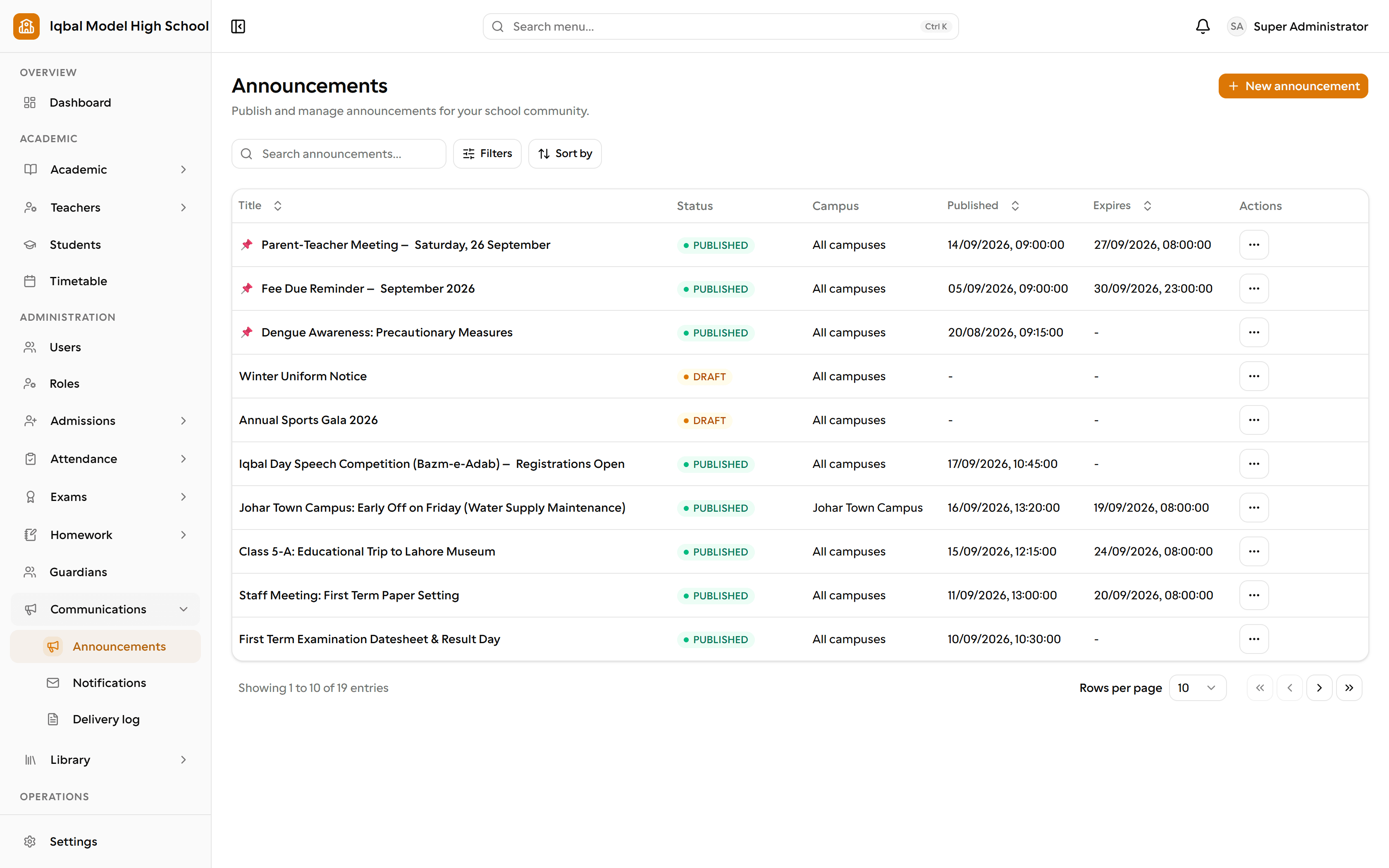
Publish a notice to everyone or target it by campus, class, section or role, pin the important ones, and let the rest expire on their own.
Twenty notification events
Twenty built-in events across homework, attendance, exams, fees, payroll, leave, admissions and library, each switchable on or off for your school.
Email, SMS and WhatsApp
Each event can go out by email, SMS, WhatsApp or the in-app inbox, and you choose who receives it.
- SMS and WhatsApp need a messaging provider account for your school; the provider charges for the messages.
- Students receive notifications in their portal inbox, since EDUTIG does not store a student email address or phone number.
Editable message templates
Rewrite the wording of every message with simple placeholders for the school, student, amount or date, and preview it before it goes out.
In-app inbox
Every portal has a notification bell with its own inbox, so a message still lands even when a family has no email address.
Delivery log
Every message attempt is logged with its recipient, channel and status, so you can check what was actually sent.
Automatic reminders
A daily job reminds guardians of upcoming fee due dates and borrowers of library books due or overdue, without sending the same reminder twice.
- How many days before a due date the fee reminder starts is a setting you control.
How the work flows
Write the notice
Draft it, target it at everyone or at a campus, class, section or role, pin the important ones and give the rest an expiry date.
Choose what gets sent
Twenty built-in events across homework, attendance, exams, fees, payroll, leave, admissions and library. Switch each one on or off, and pick the channels and who receives it.
Say it in your own words
Rewrite the wording of every message with simple placeholders for the school, student, amount or date, and preview it before it goes anywhere.
It reaches people
Email, SMS, WhatsApp and a notification bell in every portal, so a message still lands for a family with no email address.
Check what went out
Every attempt is logged with its recipient, channel and status. Fee due dates and library overdues are reminded automatically, without duplicates.
What you need first
- An SMTP mailbox for email, and a messaging provider account for SMS or WhatsApp.
- Guardian phone numbers and email addresses on the student records.
How it behaves
- SMS and WhatsApp need a provider account for your school, and the provider charges for the messages.
- Students receive notifications in their portal inbox; EDUTIG does not store a student email address or phone number.
- Announcements reach the portals at once, on the web and in the app; alerts on a phone's lock screen are in development.
In development for this area
Being built now, not yet available. Each line says what happens today instead.
Mobile push notifications
Announcements reach the portals immediately, and email, SMS and WhatsApp are available today. Push notifications to a phone's lock screen are being built.